PolyRun Control
PolyRun Control turns your smartphone into a super-responsive 3-lane runner controller for PolyRun on the shared display!
Features
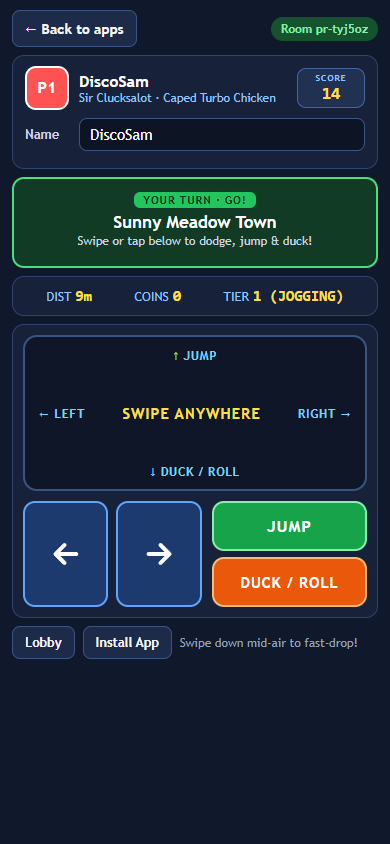
- Dual-mode runner controls: Swipe Left, Right, Up (Jump), or Down (Duck / Fast-Drop) anywhere on the big central swipe pad, or tap the crisp LEFT, RIGHT, JUMP, and DUCK / ROLL buttons.
- Quirky character picker: Cycle between all 6 playable polygon heroes (Sir Clucksalot, Waddles, Bloop, Toastie, Capt. Quack, and Bongo) right from your phone.
- Turn-based party status: Lights up bright green with haptic feedback when it is your turn to run, and shows your queue position while watching friends.
- Spectator Cheer button: Tap CHEER! GO! while waiting your turn to fire confetti and party horns on the shared screen!
- Custom player name: Edit your runner name at any time without losing your score or turn slot.
Joining and playing
- Scan the QR code shown on the PolyRun display, or launch PolyRun from the RCWeb App Launchpad (
/v-c/). - Pick your character and tap Start Running when everyone has joined.
- Tap Back to apps at the top-left to return your phone to the RCWeb App Launchpad while leaving the shared display running.