RCWeb Stack Fall Controller
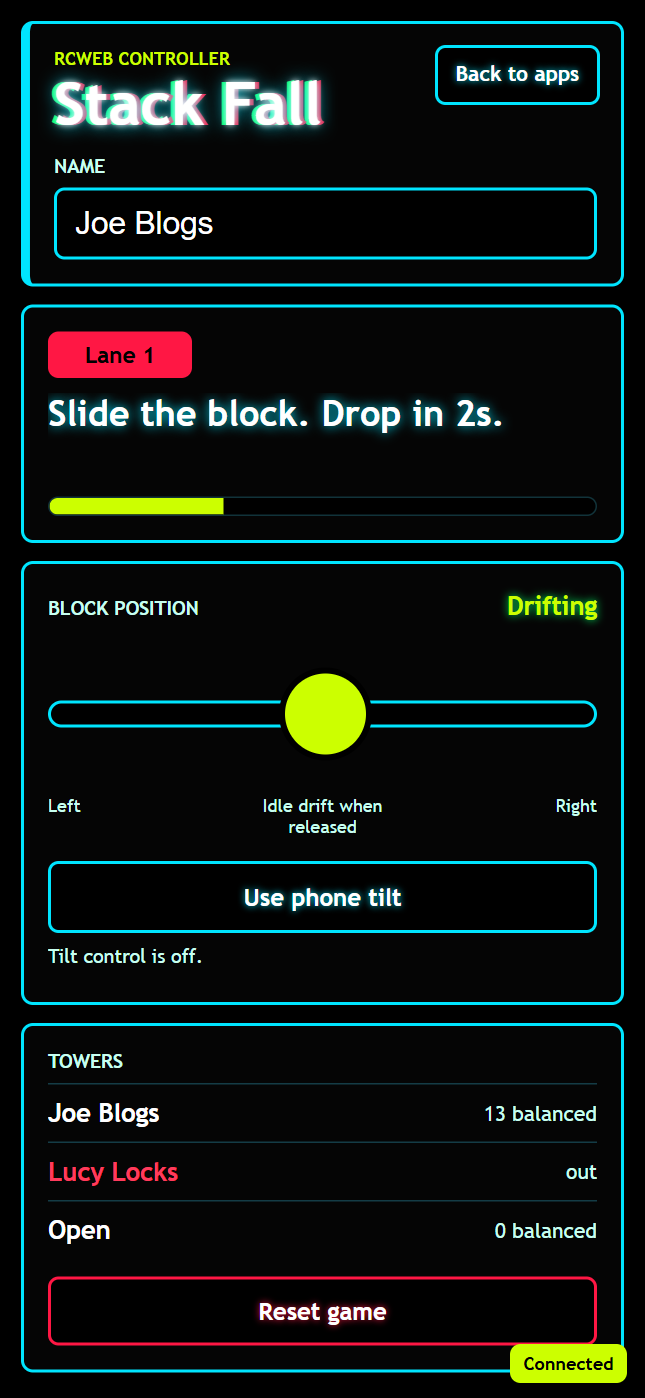
The Stack Fall Controller (app/stack-fall-c) is the phone companion for the Stack Fall display. Each player joins a lane, enters a saved display name, and controls the horizontal position of the next falling piece before the shared countdown releases it.
Open the shared display at /stack-fall/?r=<room> and scan its QR code, or open /stack-fall-c/?r=<room> directly on a phone in the same RCWeb room. The controller includes a Back to apps link to /v-c/?r=<room>#apps, matching the navigation pattern used by other RCWeb controller apps.
The controller shares the display's OLED-friendly visual style: black panels, saturated lane colors, cyan borders, lime countdown accents, and a neon title treatment.
Screenshot
What It Does
- Lane joining: Registers the phone with the
stack-falldisplay and receives an assigned lane when space is available. - Saved player name: Reads and writes the default name using local storage key
rcwebName, so the user's name carries across RCWeb apps. - Analog aiming: Uses a wide touch slider to position the active piece left or right during the aiming window.
- Idle drift handoff: When the slider is released, the controller tells the display the player is no longer touching the control, allowing the display's random drift behavior to resume.
- Optional phone tilt: Can use
DeviceOrientationEventwhen available. The first reading recenters the phone, then one tilt axis drives the same analog block position as the slider. - Local countdown: Shows the drop progress from timestamps in display snapshots, without requiring constant timer updates over WebSocket.
- Room scoreboard: Displays the current lanes, balanced counts, and out status from the latest display snapshot.
How To Play
After joining, watch the lane label and status text. When the display begins a drop cycle, use the slider to aim the piece before the countdown reaches zero. The slider sends analog movement to the display while it is touched. Releasing the slider makes the piece drift on its own again.
If phone orientation is supported, tap Use phone tilt. Hold the phone naturally for the first reading to set center, then tilt left or right to move the piece. The controller throttles tilt updates and only sends meaningful changes, so a resting phone does not spam the WebSocket.
The Reset game button sends a reset request to the display. The Back to apps button returns to the RCWeb app picker for the same room.
How It Works
The controller is intentionally thin. It stores identity locally, renders the current snapshot from the display, and sends player intent back to stack-fall through rc.sendFunctionCall.
Important controller calls:
stackFall.registerController(participantId, name, rc.client)joins or refreshes the player's lane.stackFall.controlBlock(participantId, rc.client, sliderValue, touched)sends analog aiming state.stackFall.resetGame()asks the display to restart the game.
The display replies with stackFallControl.receiveSnapshot(snapshot). Snapshots include lane assignment, player color, score, out state, phase, release time, reset time, server time, status text, and public lane summaries. The controller uses those timestamps to update its countdown bar locally between snapshots.