RCWeb Remote Controller
The RCWeb Remote Controller (app/v-c) is a mobile-styled controller for the Viewer (v) app. It implements an Asymmetric (Sender/Viewer) pattern — converting user gestures into commands and content payloads sent to viewer (v) apps in the same room.
Screenshot
Overview
This app acts as the master remote control for an RCWeb room. From a phone or tablet, it allows you to instantly push colors, media, web embeds, code, or switch between full RCWeb apps on all connected shared displays.
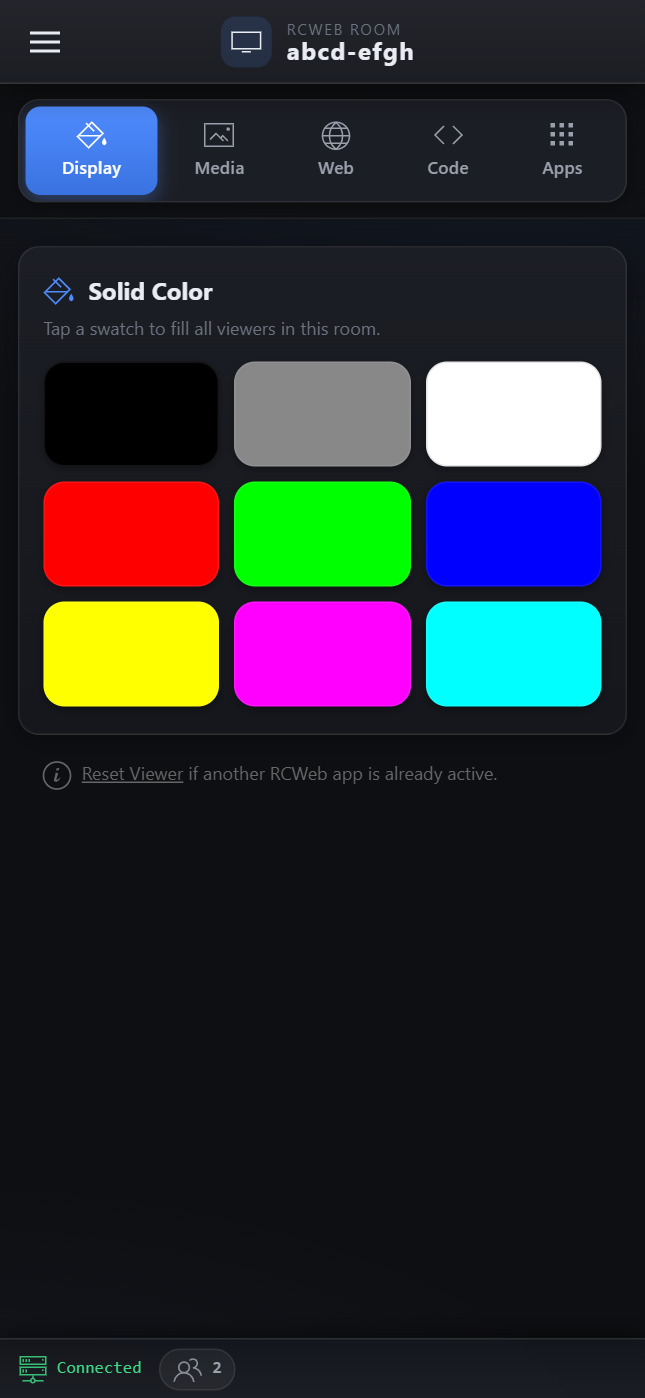
It uses a mobile-native UIKit design with an off-canvas side menu, a segmented section tab bar, and a categorized, searchable app launchpad. A fixed bottom status bar shows your connection status and the number of active clients in the room.
How to use
- Open
/v-c/(or/v-c/?r=<room>) on a smartphone or tablet browser. - Ensure you have one or more
/v/(Viewer) apps running on a shared display or desktop browser in the same room. - Tap the segmented section tabs (Display, Media, Web, Code, Apps) to switch between control panels.
- Display: Tap a solid color swatch to instantly fill the viewer.
- Media: Paste an image/video URL or upload one from your device to push it to the viewer.
- Web: Embed websites inside an iframe or force the viewer to redirect to a new URL.
- Code: Type raw HTML or JavaScript and execute it on the viewer instantly.
- Apps: Browse the categorized App Launchpad, use the search bar, or filter by tags (Games, Media, Collab, Tools, Experimental) to launch a new app across the room.
- Open the off-canvas menu (top left) or look at the Apps > Tools section to "Reset Viewer" and return it to its default state.
Controller features
- Categorized App Launchpad: A touch-friendly grid of all available RCWeb apps, grouped into categories.
- Live Search & Filters: Instantly find apps using the search bar (which scans names and hidden tags) or filter pills.
- Streaming Uploads: Send local images or videos directly to viewers without prior uploading. Files under 1 MB use base64 strings; larger files stream peer-to-peer via the
/x-file/...proxy route. - Mobile-Optimized UI: Designed specifically for a phone screen with touch-friendly buttons, off-canvas navigation, and clear visual feedback.
- Real-Time Status: The bottom status bar shows the connection state and dynamically updates with the count of clients currently in the room.
How RCWeb makes it possible
RCWeb allows seamless, real-time message passing without a complex backend structure. When you perform an action in v-c (e.g., clicking the Red color button, uploading an image, or tapping the "Snake Pro" app tile), the app constructs a JavaScript payload.
Using the RCWeb communications library, it dispatches this payload with rc.send(js, "v") to all Viewer apps in the room. When switching apps, it uses a wildcard exclusion like rc.send(js, "!c,*-c") to tell all non-controller apps to navigate to the new app URL, while leaving the controller apps exactly as they are.
Related app
Use this app to control the RCWeb Viewer (app/v) or any other RCWeb app in the room.