RCWeb Music Player Controls
The RCWeb Music Player Controls app (app/music-player-c) is the phone and tablet controller for the RCWeb Music Player Display (app/music-player).
Features
- Add local audio files and reorder the shared queue.
- Play, pause, seek, skip, loop and change volume.
- Choose visualizer presets and display overlays.
Screenshot
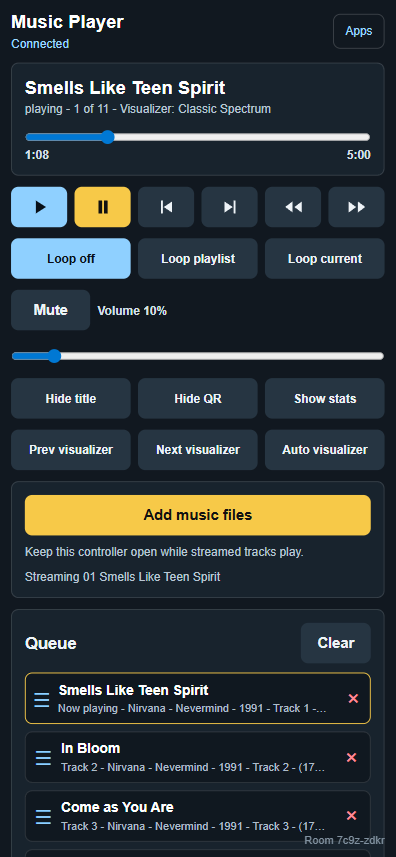
Overview
This app gives users a remote control surface for every active music-player display in the same RCWeb room. It can add local audio files, manage the playlist, control playback, adjust audio, toggle display overlays, and choose visualizer presets.
Multiple phones can use the control app at the same time. Each controller receives display state updates and can contribute to the shared queue by selecting local audio files from their device.
How to use
- Open
/music-player/on the main display. - Scan the QR code shown by the display.
- Tap Add local files and select one or more audio files (e.g. MP3s) from your device.
- Once files are added to the queue, use the playback buttons to play, pause, skip, or seek.
- Drag queue items by their handle to reorder the playlist.
- Use the lower controls to change loop mode, mute, volume, display overlays, and visualizer styles.
Note: Since files are served directly from the phone that added them, the browser tab must remain open while those tracks are playing.
Playback controls
- Play and pause the current audio track.
- Move to the previous or next queue item.
- Seek with the progress slider.
- Select any queued item to start playback immediately.
- Remove individual queue items or clear the entire queue.
- Reorder the queue by dragging items on desktop or mobile.
Playlist and file controls
- Select local audio files to add them to the shared queue.
- The controller automatically extracts common MP3 ID3 tags (title, artist, album, year, track, genre) before sending tracks to the display.
- Keep this tab open so the display can play the files you add.
- Continue controlling the playlist even when more than one control app is open.
Display controls
- Show or hide the title metadata overlay on the main display.
- Show or hide the QR code on the main display.
- Show or hide the main display's diagnostic stats panel.
- Control mute and volume for the viewers.
- Choose loop off, loop playlist, or loop current item.
- Cycle visualizer presets with Previous/Next.
Multiple viewers and controllers
The control app sends commands to all music-player display apps in the room while excluding control apps. This means one phone can control many screens, and several phones can add to or operate the same shared playlist.
When the control app starts, it requests the current state from displays in the room. The phone updates to show what is playing and queued.
Related app
Use this app with RCWeb Music Player Display (app/music-player).