PolyCrash Control
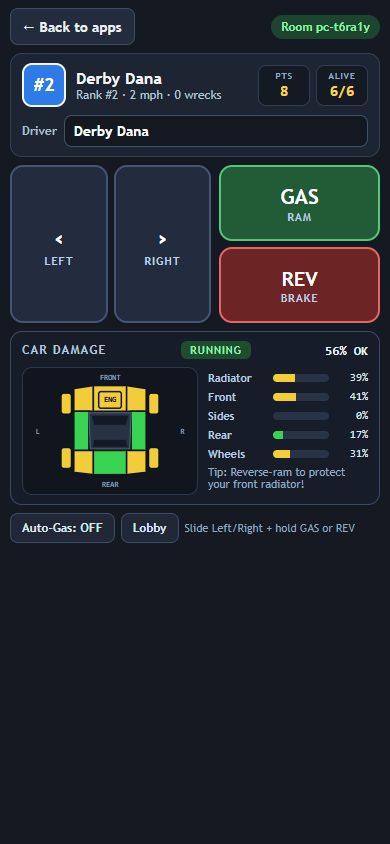
PolyCrash Control turns your smartphone into a Destruction Derby stock-car controller for PolyCrash, complete with a live multi-part car damage diagram right below your driving controls.
Features
- Multi-touch driving controls: Slide your left thumb across the LEFT / RIGHT steering pad while holding GAS to ram forward or REV to brake and reverse-ram rivals with your rear trunk.
- Optional Auto-Gas mode: Toggle Auto-Gas on to drive forward automatically and tap REV whenever you need to brake or back out of a pileup.
- Live car damage diagram: Directly beneath the controls, a top-down car diagram tracks real-time damage to your front bumper, radiator/engine, front corners, left and right doors, rear quarters, trunk, and all four wheels from green (healthy) through yellow, orange, and red to wrecked.
- Driver identity: Enter your driver name (saved on your device) and match your colored badge (
#1–#6) to your car in The Bowl. - Instant lobby controls: Tap Start Derby or Next Derby right from your phone, or use Back to apps to return to the RCWeb App Launchpad without interrupting the shared display.
How to play
- Scan the QR code on the PolyCrash screen (or launch PolyCrash from the RCWeb App Launchpad).
- Confirm your car number and color badge, then tap Start Derby when everyone is ready (empty seats are driven by AI).
- Watch your damage diagram below the pedals—if your front ENG radiator turns orange or red, reverse into opponents with REV to stay alive and avoid smoking out!