PolyBonk Control
PolyBonk Control turns your smartphone into an analog movement joystick, level picker, and live upgrade controller for RCWeb PolyBonk, supporting up to 6 simultaneous players across all 6 worlds!
Features
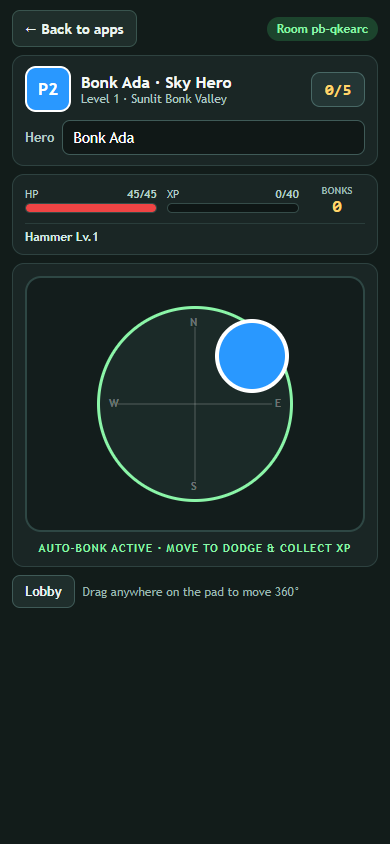
- 360-degree analog touch joystick: Drag smoothly in any direction anywhere on the pad to run, dodge hordes, weave through boss meteor strikes, and scoop XP gems.
- Automatic attacks: No fire or attack button needed—all of your equipped weapons bonk, slash, freeze, reap, shoot, explode, and zap automatically whenever enemies come near.
- Live 3-choice upgrade cards: Whenever you level up, 3 colorful upgrade choices (including Rare, Epic, and Legendary tiers) pop straight onto your phone so you can add new weapons, level up gear up to Lv.8, or stack stat tomes with one tap.
- 6-level selector & campaign advance: Switch between all 6 polygon worlds directly from the lobby strip, and tap Next Level after defeating a boss to advance while keeping your full arsenal and upgrades.
- Live hero dashboard: Track your hero color (
P1–P6), HP bar, XP progress, upgrade count (0/5toward each level's Boss), total bonks, equipped weapons, and live boss health right in your hand. - Custom hero name: Edit your hero name at any time (saved across RCWeb games) without losing your slot, weapons, or kills.
How to use
- Scan the QR code on the PolyBonk display (or launch PolyBonk from Back to apps).
- Enter your Hero name, use the level arrows to pick any of the 6 worlds if desired, and tap Start Adventure.
- Drag your thumb on the analog joystick to explore, collect glowing XP crystals, and trigger shrines.
- When LEVEL UP! CHOOSE 1 OF 3 appears, tap one of the 3 upgrade cards to power up and jump right back into the fight.
- Tap Back to apps at the top left to return to the RCWeb App Launchpad on your phone without interrupting the big screen.