Graffiti

Turn a shared screen into a wall everyone can paint together. See the same drawing on the main display and on every phone, including people who join later.
Features
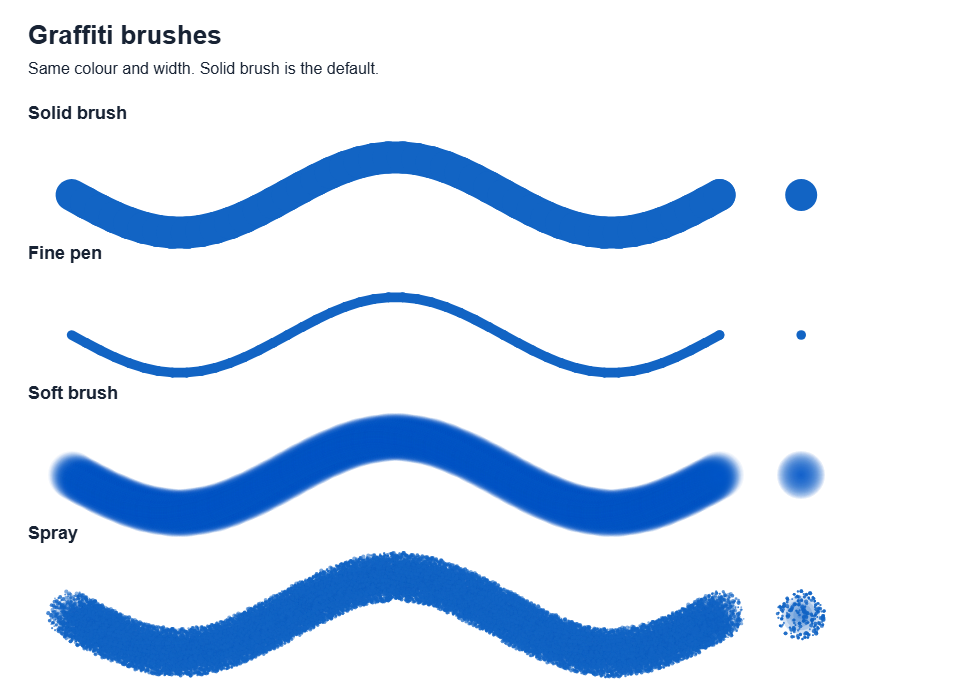
- Five useful tools: opaque Solid brush (the default), Fine pen, feathered Soft brush, bold speckled Spray and Eraser.
- Adjustable colour and brush width.
- A pen icon with each painter's name at their drawing position, visible on the display and phones.
- Touch or mouse drawing, plus optional phone motion aiming.
- A QR invitation for more painters, and shared clearing.
How to paint
- Open Graffiti on one shared display.
- Scan its QR code to open Graffiti Control in the same room. Several people can join and draw at once.
- Set Your name, choose a Brush, Paint colour and Width.
- Drag on the white wall on your phone. Tap to make a dot. Everyone sees the accepted drawing on their own screen.
Your name is shared with other RCWeb apps using rcwebName. Names allow up to 24 characters; repeated spaces are collapsed. If the browser cannot save your name, it still works for this visit and a message explains this.
If Enable Motion is available, allow motion access, hold the phone comfortably and use Re-center. Tilt to aim the named pen, then touch and hold the wall to paint. Turn motion off to return to drag drawing.
Eraser removes part of the shared painting. Clear Canvas clears the wall for everyone. Keep the display open: reloading or closing it loses the current painting. Phones reconnect to the current wall automatically; painting pauses while disconnected or loading.
Brushes
Screenshots
