Human Override — Controller
Your phone is your fighter's controller. Team up with friends in Human Override, a street-fighting adventure for one to six players.
Features
- A draggable joystick and large attack buttons.
- Your health, score, Overdrive charge and weapon status at a glance.
- Fighter selection, player names and a crew menu.
- Joining an ongoing game when a place is available.
Join and start
- Keep the main game open on the shared screen.
- Join its RCWeb room on your phone, or scan the game's QR invitation.
- Choose an available fighter and enter your name.
- Tap Start Human Override. Advance through the comic, then start fighting!
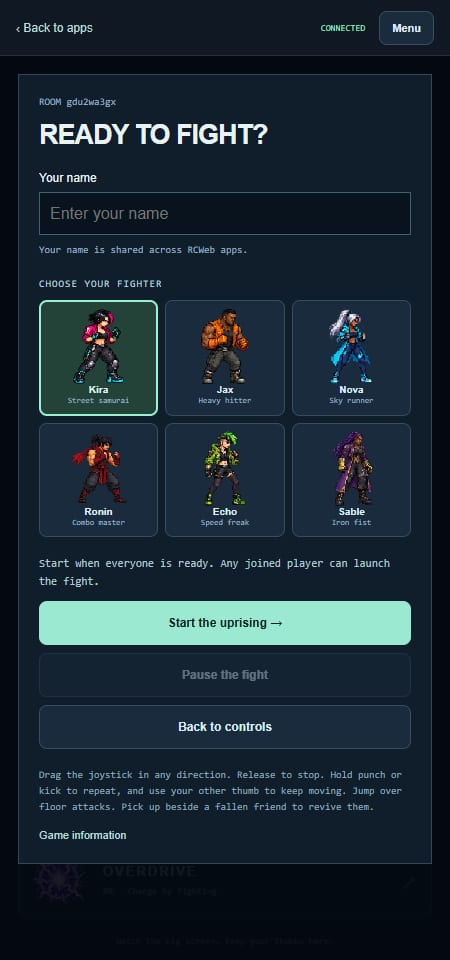
You can join an ongoing fight if a place is available. The controller connects you automatically and opens the controls. If the crew is full, leave this page open to join when a place becomes free.
Move with one thumb, fight with the other
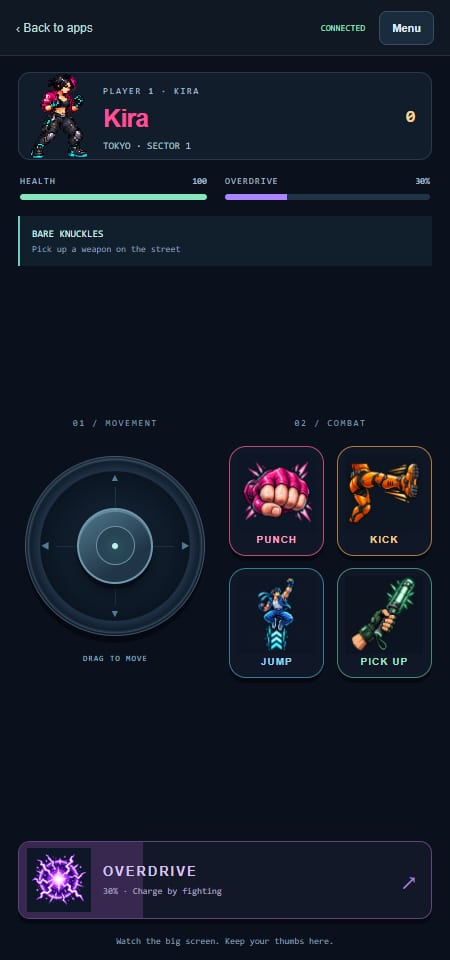
- Joystick: drag to move; release to stop. Move up or down to line up with enemies.
- Punch: hold for repeated combinations. With a weapon equipped, this swings it.
- Kick: hold for heavier attacks that can break a robot's guard.
- Jump: clear ground attacks. Attack in the air for a flying kick.
- Pick up: collect a nearby weapon or revive a fallen friend.
- Overdrive: fight to fill the meter, then tap when it is ready.
Your health, overdrive charge, score and equipped weapon appear above the controls. Weapons wear out; check the remaining hits beneath the weapon name.
For the team's remaining automatic respawns, look for TEAM REVIVES at the bottom-right of the shared game screen. Read the full player guide for weapons, bosses and survival tips.
Menu, pauses and a fresh start
Open Menu to change your name or see the game options. Choose your fighter before the game starts.
The crew captain can pause and resume. Any joined player can start a game or choose Fight again after it ends. The captain is the first connected player.
If the main viewer is refreshed and resets to the lobby, this controller returns to the setup screen. Choose a fighter and start again when everyone is ready.
If the connection drops
Keep this controller open and visible while you play. A quick refresh normally keeps your fighter and score. If you leave it hidden or disconnected for longer, your place becomes available to someone else.
If you see Connecting to the viewer, check that the game is open and both devices show the same room. The controller retries automatically.
Back to apps leaves the crew and returns this phone to the room's app picker. The shared game keeps running for the other players.