Shaderfun
Turn your screen into a living light installation. Thirty original GLSL artworks fill the display, with a gallery on your phone to choose the atmosphere and make it your own.
Thirty worlds
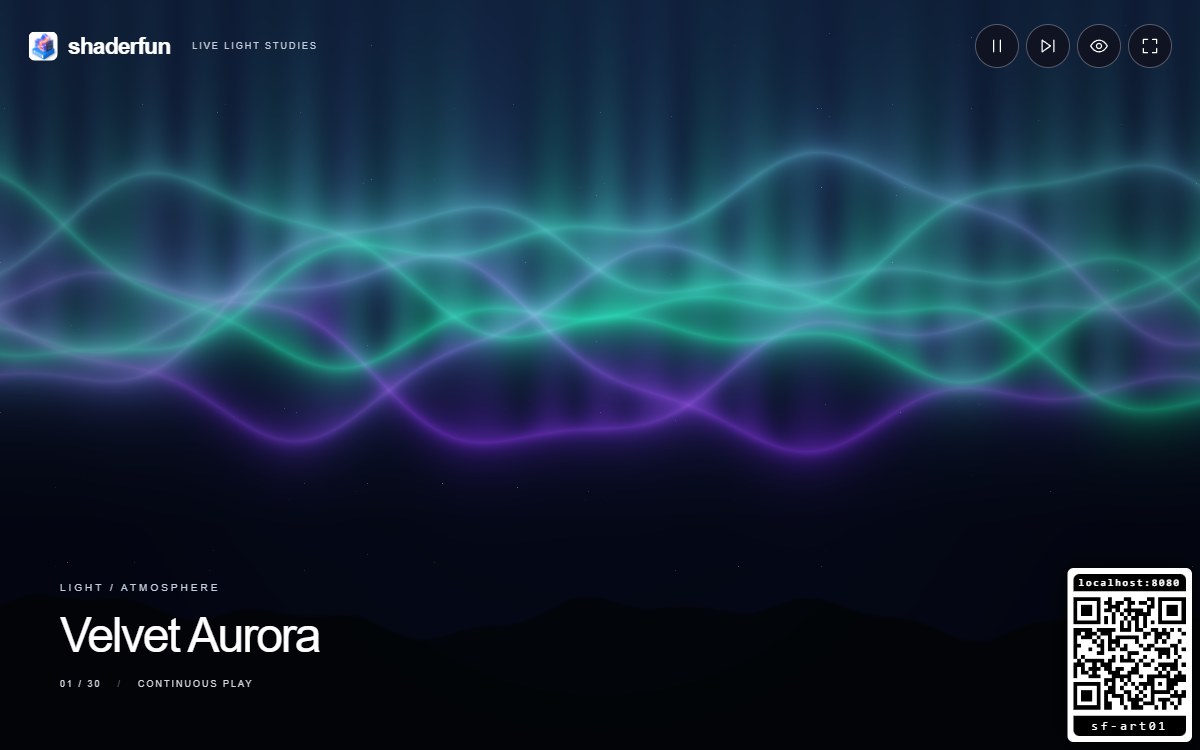
- Velvet Aurora — luminous green and violet curtains above a midnight mountain horizon.
- Event Horizon — a dark black-hole silhouette framed by a bright lensing arc and a racing, edge-on plasma disc.
- Liquid Iris — an ocean of iridescent chrome, with flowing reflections and liquid highlights.
- Prismatic Drift — a gentle journey through a hexagonal neon cathedral.
- Abyssal Ballet — translucent jellyfish drift through deep water, trailing ribbons of blue and pink light.
- Solar Bloom — a turbulent golden star surrounded by looping magnetic fire.
- Tidal Glass — turquoise water refracts sunlight into ever-changing caustic lace.
- Opal Engine — pearlescent moons circle a polished, luminous heart.
- Nebula Loom — rivers of blue and magenta cosmic dust flow through a field of stars.
- Gilded Dunes — layers of golden ridgelines shift beneath a copper sun.
- Electric Mycelium — a breathing fractal lattice grows delicate bioluminescent branches.
- Infinite Rose — an unfolding kaleidoscope of glowing petals and jewel-like highlights.
- Rings of Titan — a rotating, storm-banded gas giant with finely striped rings that gently change their tilt.
- Chromatic Silk — broad ribbons of iridescent satin fold through a midnight studio.
- Midnight Circuit — glowing city towers and a neon boulevard beneath a striped sunset.
- Storm Lantern — blue clouds surround branching, gently moving electric light.
- Porcelain Current — golden sparks travel through a labyrinth of glazed jade and ivory channels.
- Lantern Grove — golden fireflies wander between layers of moonlit forest.
- Gilded Ink — indigo and ivory marbling curls around delicate veins of liquid gold.
- Helix Observatory — three luminous double helices rotate like astronomical instruments.
- Clockwork Garden — five meshing brass gears turn at matched mechanical ratios.
- Firework Symphony — rockets blossom into colourful bursts, with sparkling trails and falling embers.
- Origami Migration — folded paper birds lift their wings through an evening sky.
- Peacock Pavilion — sapphire and bronze feathers sway around luminous eyes.
- Crystal Choir — amethyst and ice-blue crystals float through shifting light.
- Molten Motion — glossy amber and magenta blobs merge and separate.
- Koi Sanctuary — three patterned koi swim through a sunlit pond.
- Lunar Survey — a drifting close-up of silver craters and sharply lit relief.
- Starlight Express — blue and violet star trails stream past in deep space.
- Op Art Weave — black and ivory checkerwork bends like a breathing fabric.
These are live animations, generated on your display. There are no videos to download, no sound and no external artwork services.
Get started
Open Shaderfun on your display. It begins playing immediately and rotates through all thirty artworks every minute. Scan the QR invitation with your phone to open Shaderfun Control in the same room. Existing RCWeb controllers follow when you launch the app from Back to apps.
One or more phones can control the shared display. Additional displays in the room follow the same settings. A screen must remain open for phone control to work.
Set the mood
Tap a gallery thumbnail to select an artwork immediately. Tick the top-right checkbox inside each thumbnail to choose the artworks for continuous play, or use Include all to restore the complete collection. Keep at least one selected. Automatic rotation and Next follow your selection in gallery order; you can still tap an excluded artwork to play it immediately. Changing the selection does not interrupt the current artwork. Your loop selection is saved with your room preferences and shared across controllers. When new artworks are added, a complete collection loop expands automatically; custom selections stay as you chose them.
Adjust motion from 0.25× to 2×, brightness and colour shift. Pause to hold a frame. Automatic rotation can change scenes every 30 seconds, 1 minute, 2 minutes or 5 minutes; switch it off to keep your favourite. Pause also pauses the rotation timer.
Show or hide the artwork title and QR invitation independently. The QR panel can sit in any corner. Your preferences are remembered by the display browser for this room when browser storage is available.
On the display
Move the mouse or touch the screen to reveal the toolbar. It includes pause, next, hide/show overlays and a fullscreen icon. Fullscreen requires a tap or click on the display. Press Space to pause, Right arrow for the next shader, or F for fullscreen. Controls fade after a few seconds of inactivity.
Quality
Adaptive balances sharpness and smooth motion separately for each artwork. Use it on older TVs: lighter scenes can render more pixels, while detailed scenes keep enough headroom for smooth animation. Low power sets a fixed lower resolution. High detail favours sharpness and needs a faster GPU. The display must support WebGL. If graphics are interrupted, the app offers a retry while RCWeb remains available for switching apps. Frame rate depends on the display and browser.