Pebbles and Powder Command
Plan, place and defend a little polygon valley. This is the complete one-to-six-player game on your phone, with an overhead battlefield and large touch controls. A shared display is optional.
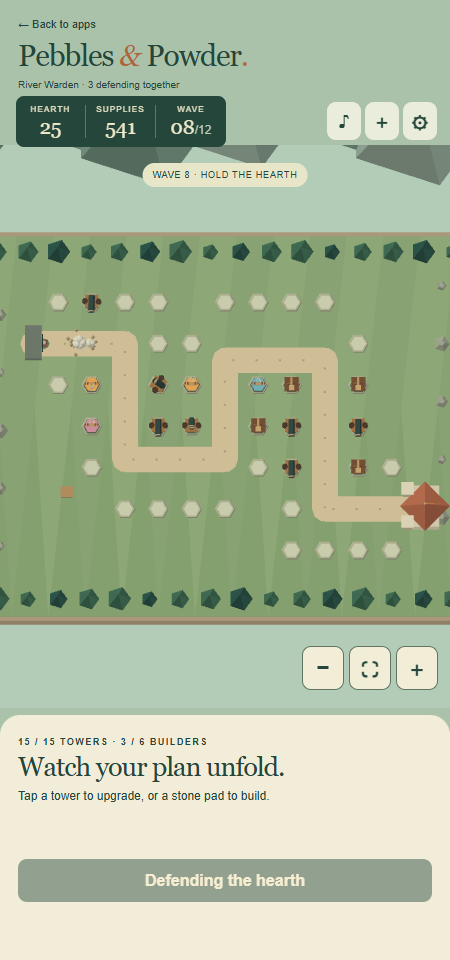
Play on your phone
Open this app directly or select Pebbles and Powder in the launcher. Tap a pale stone pad, build a Pebble Post, then press Start the siege. Towers attack automatically while you decide where to spend the team's supplies.
- Tap a pad to choose a tower. Locked weapons show the wave when they become available.
- If you cannot build, the panel explains why: the tower limit, missing supplies, a reserved player place or a connection delay. Each unaffordable tower shows how many more supplies it needs. At the tower limit, you can still upgrade existing towers or sell them to make room.
- Tap a tower to see its range, upgrade it or sell it. Selling returns 65% of its investment.
- Drag the map to look around. Pinch or use + and − to zoom. The fit button recentres the whole battlefield.
- The gear menu lets you change your name, reduce effects or restore a saved siege. Names are limited to 20 characters and are shared with other RCWeb apps on this browser.
- Tap + beside the sound and settings buttons to invite friends into the same room.
- Select the music-note button to enable or mute sound on this device.
- Back to apps leaves this phone's game view and returns to the launcher in the same room. It does not navigate the shared display.
You can build during waves. Between waves, use the brief pause to upgrade, or press Next wave to shorten the countdown. Survivors clear twelve waves, then choose Endless or a new defence.
The wave track marks cleared waves in green and the current wave in gold. Watch the remaining-raider count and announcements for new weapons and siege engines. When the defence ends, a clear Victory or Defeat panel shows waves cleared, raiders stopped and your team's score. The battlefield stops fighting; the buttons below let you build again or continue into Endless after a win.
Build a combination
Pebble hits crack enemy armour. Stone Lobbers, unlocked at wave 2, slow groups. Cannons arrive at wave 4 and make the most of cracked armour. From wave 7, specialise a cannon into a short-range Scatter Cannon or a long-range Mortar.
Supplies and towers belong to the whole team. Five tower places are available per player, up to thirty. Friends can join or leave at any time; abandoned towers continue fighting. Returning within the reconnect grace period preserves your place. When all six places are occupied, additional phones watch until a place opens.
A larger team gets more enemies and reinforcement supplies. Current waves do not change difficulty halfway through, and repeated reconnection does not generate extra supplies. Keeping a large inherited defence also keeps a larger battle appropriate to it.
Returning later
Checkpoints save around wave boundaries when browser storage is available. After all devices close, return to the same room on a browser with a save, open the gear menu and choose Restore saved siege in the fresh lobby. If another device is still playing, join its live game instead.
Connection loss temporarily disables purchases. Another phone or display can take over if the current game host disappears. A short pause and small rollback may occur during recovery. The game needs its RCWeb room connection even when no display is present.
Read the full game guide for enemy progression, display options and joining details.