RCWeb NASA APOD Control
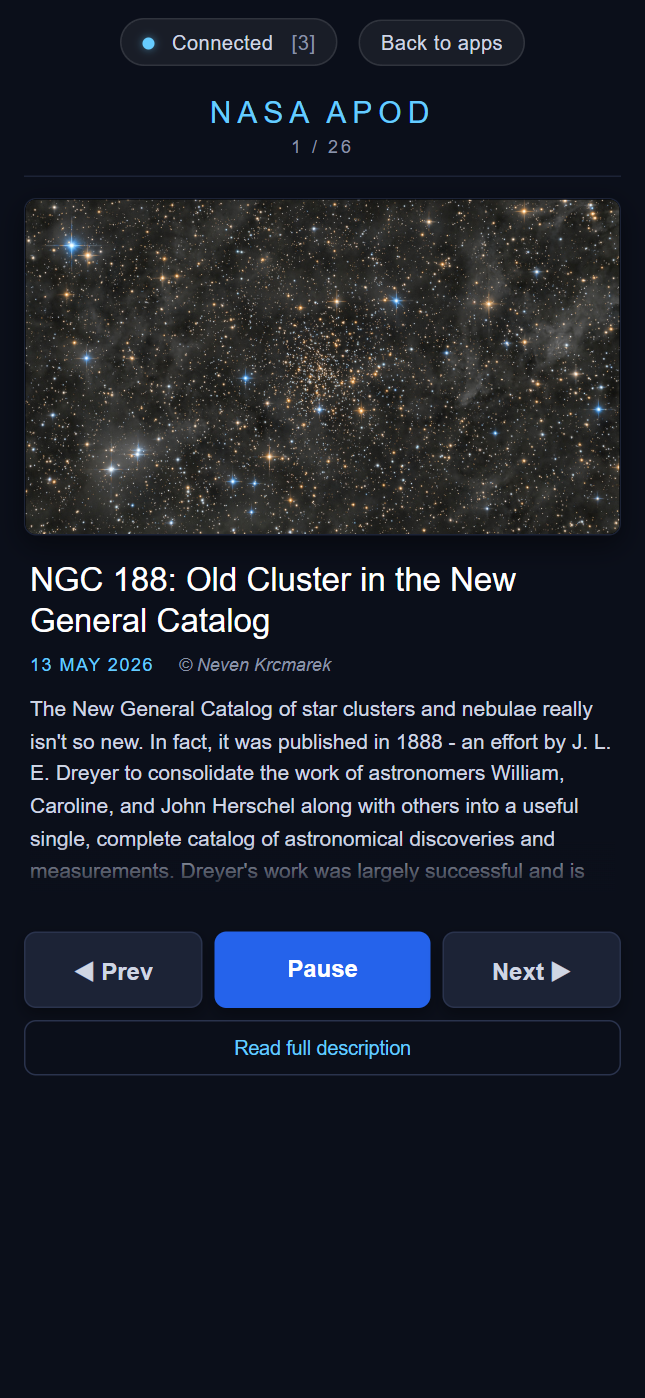
NASA APOD Control is the phone-friendly companion to the nasa-apod viewer. It lets one or more phones in a room cycle through the slideshow, pause and resume the auto-advance, and read the full NASA-supplied explanation for whichever image is currently on screen.
Screenshot
What it does
- Shows a thumbnail of the current slide
- Shows the title, date and copyright
- Shows a short, expandable description, with a "Read full description" button that opens the full NASA explanation in a clean reader view
- Three big touch buttons: Prev, Play / Pause, Next
- Keyboard arrows / space bar work too when the control is open in a desktop browser
RCWeb communication
The viewer is authoritative; the control is a thin client.
Outbound (control → viewer):
rc.sendFunctionCall("nasa-apod", "nasaApod.prev");
rc.sendFunctionCall("nasa-apod", "nasaApod.next");
rc.sendFunctionCall("nasa-apod", "nasaApod.toggle");
rc.sendFunctionCall("nasa-apod", "nasaApod.requestState", rc.client);
Inbound (viewer → control), implemented as a global callback:
nasaApodControl.receiveState({
    index: 3,
    total: 30,
    playing: true,
    slideMs: 16000,
    entry: {
        date: "2026-04-30",
        title: "...",
        explanation: "...",
        copyright: "...",
        url: "https://apod.nasa.gov/...",
        media_type: "image"
    }
});
The viewer broadcasts a fresh snapshot to every nasa-apod-c client whenever it changes slide or play state. New controllers explicitly request a snapshot on connect via nasaApod.requestState(rc.client), so they catch up even if they joined mid-slide.
Browser support
Written in ES5 with XMLHttpRequest-style code, simple flexbox layout, vendor-prefixed transitions, and no CSS Grid or custom properties — works comfortably on older mobile browsers.
URL
/nasa-apod-c/?r=<room>