MicroCars Control
MicroCars Control turns your smartphone into a responsive racing controller for RCWeb MicroCars, supporting up to 6 simultaneous human drivers alongside AI rivals.
Features
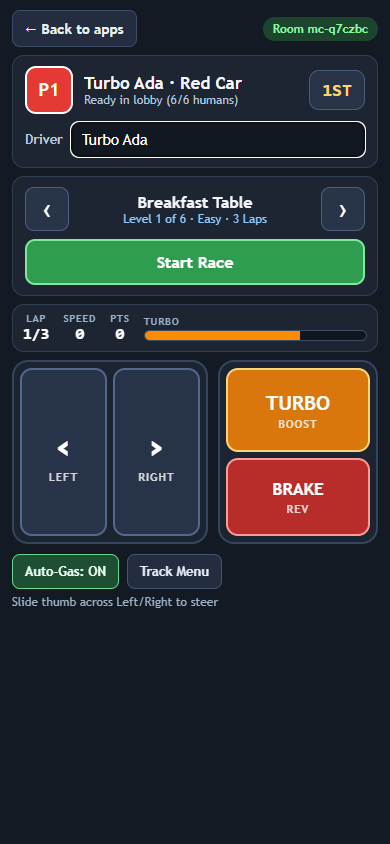
- Instant colored car seat: Connects straight into an open seat (P1–P6) and displays your car color, live race rank, lap, speed, championship points, and turbo fuel meter.
- Intuitive slideable steering: Tap LEFT or RIGHT, or keep your thumb pressed and slide smoothly back and forth across the steering pad for instant cornering.
- Auto-Gas by default: Focus on steering, braking into tight hairpins, and firing TURBO BOOST on straights—or toggle Auto-Gas: OFF for manual GAS, BRAKE, and BOOST pedals.
- Lobby and track control: Browse all 6 household tracks and start or advance races right from your phone.
- Custom driver name: Change your driver name at any time without losing your car seat or championship points.
How to use
- Scan the QR code on the MicroCars display or launch MicroCars from Back to apps.
- Enter your Driver name if you like (remembered automatically across RCWeb games).
- Tap Start Race to begin the countdown.
- Use the left pad to steer, TURBO BOOST when your turbo bar fills up, and BRAKE / REV for sharp corners or reversing out of tight spots.
- Tap Back to apps at the top left to return to the RCWeb launcher on your phone without changing the big screen.