Cast
Launch an RCWeb viewer on a Google Cast display, then use the normal room controls on your phone or computer. Cast also offers a browser display option when your browser supports it.
Features
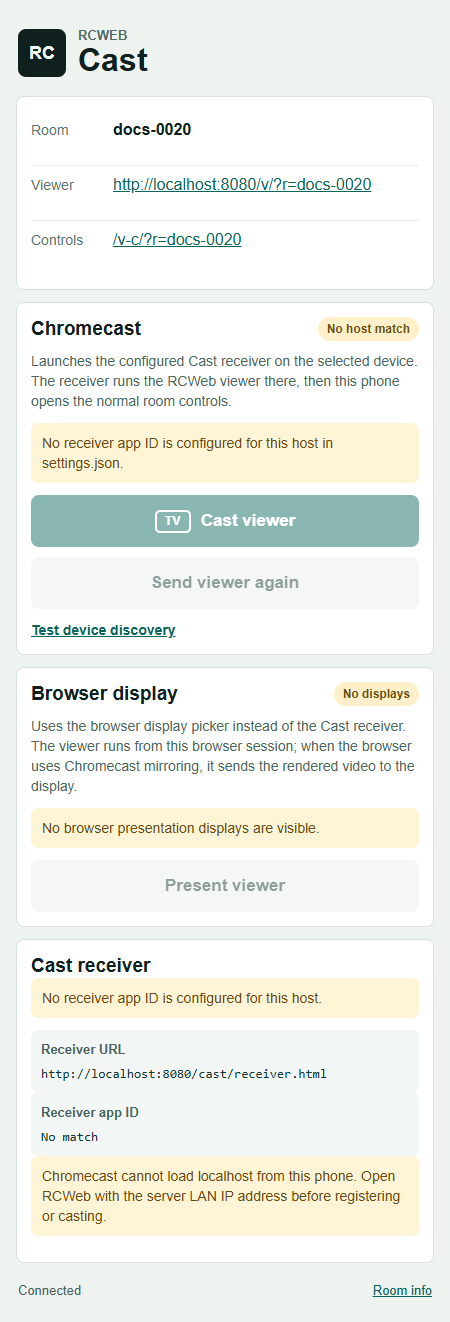
- Cast viewer to choose a configured Google Cast display.
- Send viewer again to resend the room's viewer to an existing session.
- Present viewer for the browser's display picker where available.
- Room, viewer and control links with connection feedback.
Cast the room
- Open Cast in your RCWeb room from a browser that supports casting.
- Check the room shown at the top and the status under Chromecast.
- Select Cast viewer and choose the receiving display.
- Wait for the viewer to open. This page then switches to the room's normal RCWeb controls.
- Choose what to show or which app to run from those controls.
The RCWeb installation must have its Cast receiver configured for the address you are using. Both your device and the receiving display need access to that server. Use the server's reachable secure address, not a localhost address that only refers to your own device.
Browser display option
If Present viewer is available, select it to use the browser's display picker. Depending on the browser and receiving device, this may present the page or mirror rendered video. Keep the sending browser session available while using it.
If casting is unavailable
Read the status beside the disabled control. Not configured needs attention from the person managing your RCWeb installation. An unavailable picker may mean the browser or address does not support casting; try the installation's HTTPS address in a Cast-capable browser.
Test device discovery is a diagnostic option for checking whether devices can be found. It does not launch the RCWeb viewer. The Viewer and Controls links at the top also let you open the room directly in ordinary browsers.
Screenshot