RCWeb News Control
News Control is the phone-friendly companion to the news viewer. It shows what is currently on the display, lets you cycle through the loaded screens, and reconfigures which categories the viewer will pull from thenewsapi.com.

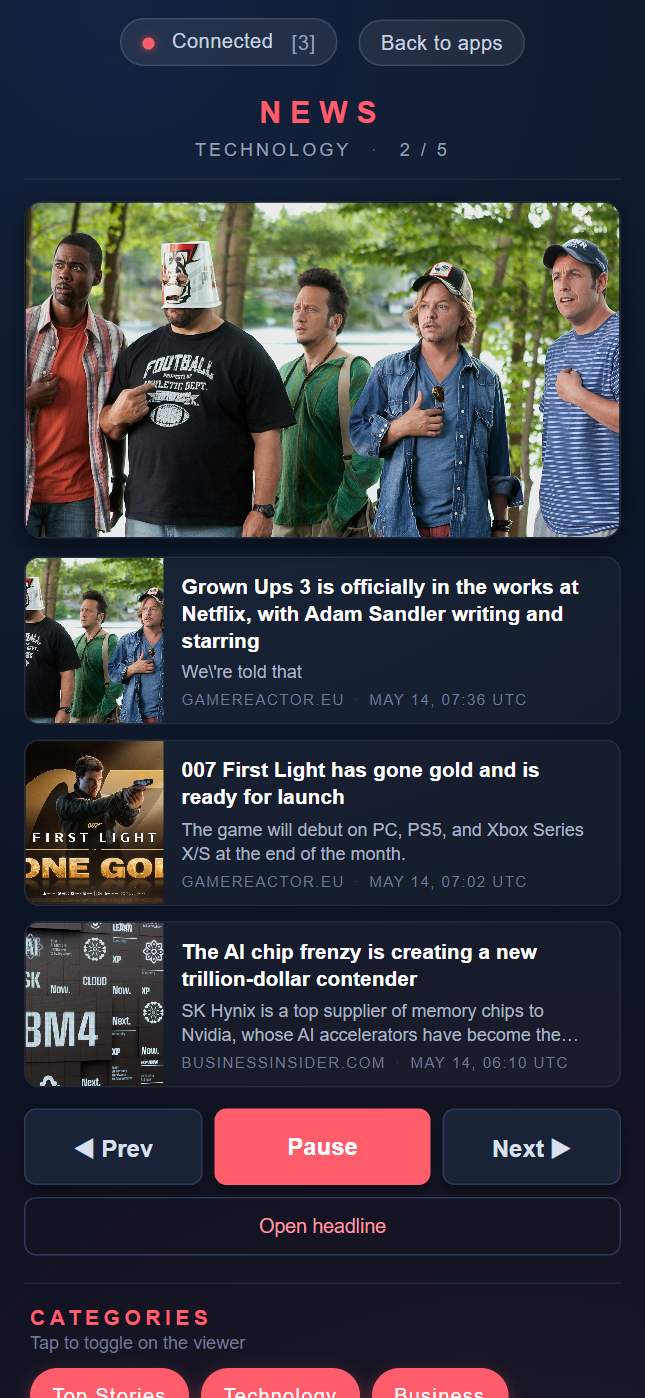
Screenshot
What it does
- Shows a thumbnail of the current screen's hero article
- Lists every article on the current screen with title, snippet, source and timestamp
- Provides large touch buttons for Prev, Play / Pause, and Next
- Provides a tappable category grid; toggling a category instantly reconfigures the viewer
- Provides a Refresh headlines action that pulls a fresh batch on the viewer
- Includes a link to the current hero article
RCWeb communication
The viewer owns all news state. The control sends commands to the viewer:
rc.sendFunctionCall("news", "newsViewer.prev");
rc.sendFunctionCall("news", "newsViewer.next");
rc.sendFunctionCall("news", "newsViewer.toggle");
rc.sendFunctionCall("news", "newsViewer.refresh");
rc.sendFunctionCall("news", "newsViewer.setCategories", ["general", "tech"]);
rc.sendFunctionCall("news", "newsViewer.requestState", rc.client);
The viewer pushes snapshots to controls through the global callback:
newsControl.receiveState(snapshot);
The snapshot contains the active screen index and total, the play state, the active categories list and the master list of all available categories so the control can render the picker even before the user changes anything.
Browser support
Written in ES5 with XMLHttpRequest-compatible state handling, simple flexbox controls, and conservative CSS for older mobile browsers.
URL
/news-c/?r=<room>