PolyShooter Control
PolyShooter Control is the smartphone flight stick and upgrade controller for PolyShooter, supporting up to 6 pilots flying together on a shared display!
Features
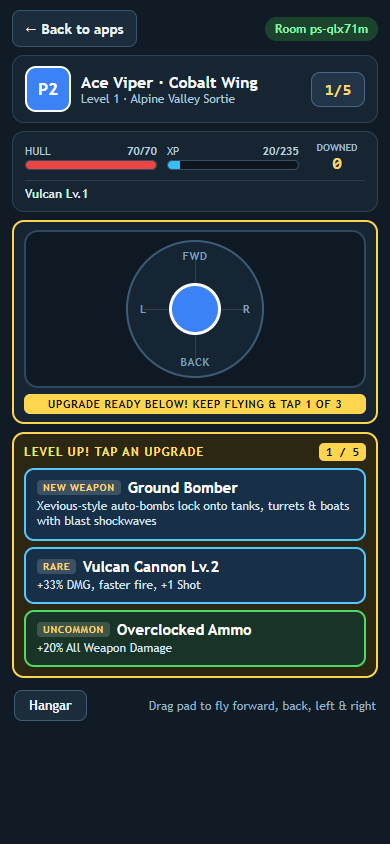
- Smooth 360-degree analog flight pad: Drag anywhere on the pad to steer your fighter plane forward, back, left, and right while your plane cruises continuously forward and fires all weapons automatically.
- Non-blocking Level Up cards right below your stick: Whenever you earn an upgrade, your phone vibrates and flashes 3 rarity-colored upgrade buttons directly underneath the active flight pad (while the display highlights your plane with a protective golden shield), so you can keep dodging and steering without interruption while tapping your pick.
- 6-world level selector & campaign controls: Switch between all 6 worlds directly in the Hangar, advance straight to the next level carrying over your arsenal, or restart from Level 1 after clearing the campaign.
- Live aircraft telemetry: Track your Hull HP, XP progress, downed enemy count, equipped weapons, and Boss HP bar right above the flight pad.
- Saved pilot callsign: Edit your pilot name once and it stays saved across RCWeb sessions.
How to use
- Scan the QR code on the PolyShooter display (or launch PolyShooter from the RCWeb App Launchpad, which opens this controller automatically).
- Enter your pilot name, choose any of the 6 worlds with the arrows in the Hangar, and tap Launch Sortie when your squadron is ready.
- Slide your thumb across the flight pad to dodge enemy fire, line up over ground tanks, battleships, and bunkers, and collect golden XP stars.
- When an upgrade flashes below your flight pad, keep flying and tap 1 of the 3 cards to unlock or level up weapons and flight modules.
- Tap Back to apps at the top-left whenever you want to return your phone to the RCWeb App Launchpad without interrupting the display.