Robot Crossing

icon

Small parts. Big friendships. Explore a little robot village, help a neighbour, and make a cottage your own.

Screenshots

screenshot

screenshot

screenshot

Install Robot Crossing

Join your village, then choose Install app in your browser. On iPhone or iPad, use Safari's Share → Add to Home Screen. The installed app uses the Robot Crossing icon, description and screenshots, and reopens the room where it was installed. Your saved robot and village still use the same browser storage.

The app requests fullscreen display and landscape orientation on launch. The browser and device decide whether those preferences are supported; the existing portrait layout remains available as a fallback. Installation requires HTTPS, or localhost for development. A phone opening an ordinary HTTP LAN address may not offer installation. See PWA installation requirements.

This is an online PWA: the RCWeb host must be reachable to launch and play. It adds no service worker or offline asset cache. The room-aware manifest uses RCWeb's existing app manifest endpoint; no server changes are required.

The village and its new neighbours

For a new player, the welcome screen prefills the name from the shared rcwebName local-storage value. Missing or blank names get a playful robot suggestion. The text is selected for easy replacement, and Options → Change name and colour remains available later. Returning players keep their saved Robot Crossing name and identity. Using or editing the suggestion does not overwrite the shared name used by other apps.

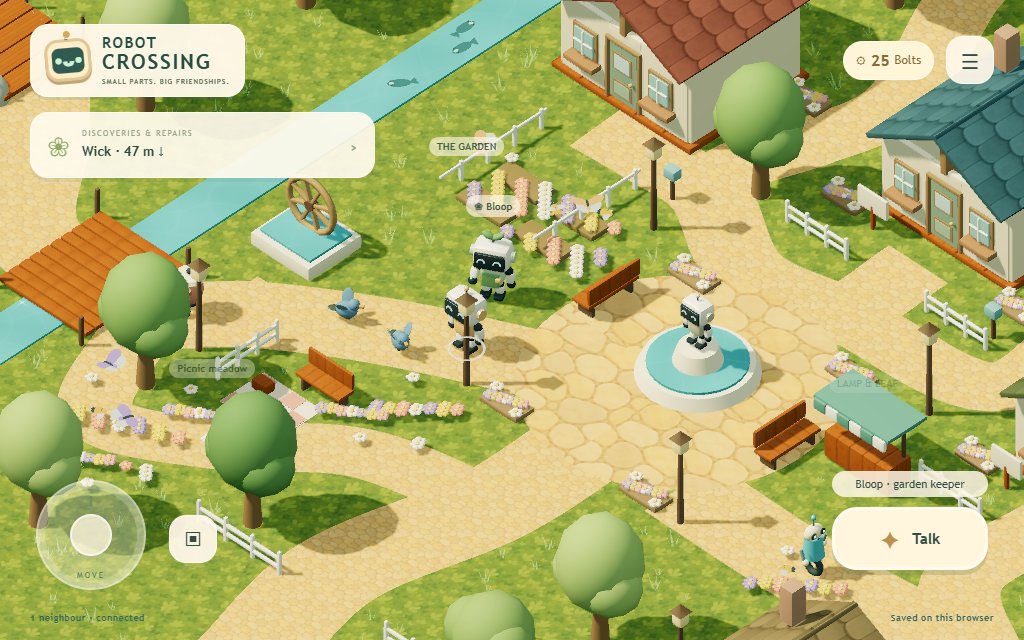
Choose your name and shell colour, then explore Brightharbour. The camera follows your robot without rotating. Trees and roofs fade when they obstruct you. World labels fade between 2.5 and 12 metres; only the nearest non-overlapping labels are shown, up to four in a tall world view or six in a wide view. Labels avoid the header, message card and controls. A compact header keeps the robot badge, bolt counter and Options together without moving the discoveries card down.

Discoveries & Repairs is also the tip card: temporary messages replace its objective, then return to the latest objective after 6.5–14 seconds according to message length. It remains a button for opening the journal. Puzzle hints and errors still appear inside the open dialog. The current location appears above Interact when no nearby target is selected; nearby targets use that same caption. Enter fullscreen / Exit fullscreen is the first option in the menu, followed by Island map. Unsupported or denied fullscreen requests display an explanation.

Camera framing responds to actual walking speed: it eases wider and higher while travelling, then drifts closer when stationary. Sustained full-speed walking shows about 28% more width than the resting view; partial joystick movement gives an intermediate view. A short start delay and a 0.85-second stop hold avoid pulsing during brief taps and pauses. Pushing against a solid obstacle does not widen the view. Interiors use a smaller zoom range, transitions reset the framing, and reduced-motion preferences keep the original fixed zoom. The isometric angle stays unchanged in both phone orientations.

  1. Meet Bloop by the flowerbeds and accept his repair job.
  2. Inspect the nearby waterwheel. Turn its pipe tiles to connect the top-left inlet to the bottom-right outlet. The hint button turns one correct tile without reducing your reward.
  3. Bring the pipe part back to Bloop. Repairing his sprinkler gives you a cosy lamp for your house, plus 300 Bolts to buy a cottage, and restores the waterwheel's animation. You start with 50 Bolts and a potted plant.
  4. Visit one of the four cottage signs. A cottage costs 300 Bolts, and each player can own one.
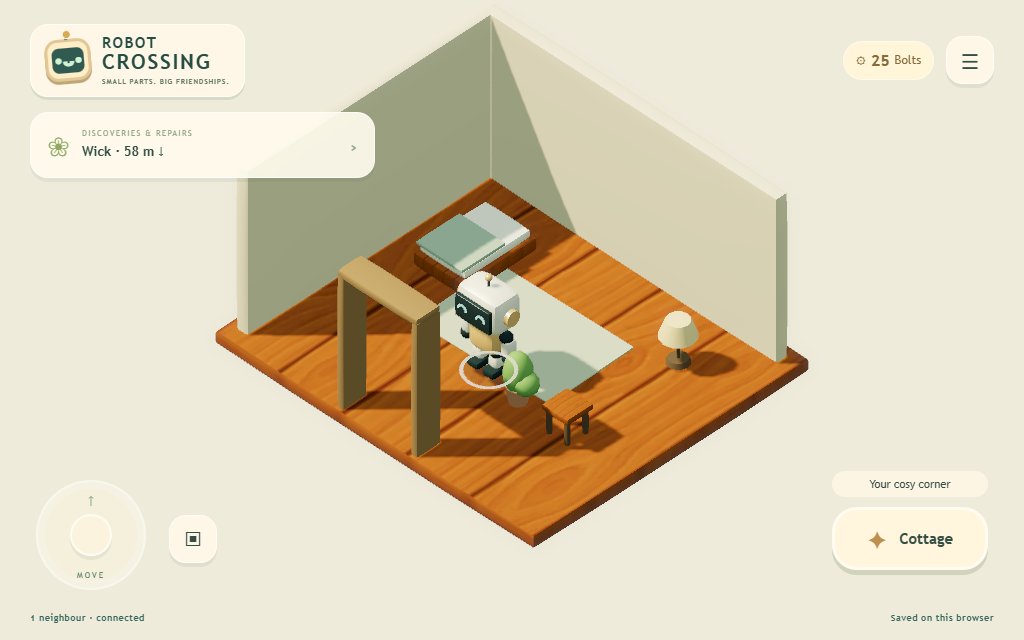
  5. Enter your house, open Bag, and tap Place beside a gift. Tap an empty + square on the room plan, then Place decoration. You can also use Options → Decorate my house, or the cottage's Arrange my decorations button. Tap a placed decoration to return it to your bag. The bed and doorway remain clear. Outside, the bag helps you find your own house or an available cottage to buy.
  6. Buy a 40-Bolt lamp at Lamp & Leaf or order one from your cottage menu.

If someone repaired Bloop before you arrived, he offers a spare-coupling calibration job with the same puzzle and reward. Each robot receives the job payment once. This core deliberately compresses the full design's longer early-game economy into one playable job.

All six repair challenges now use four numbered steps written for younger players: the goal, what to tap, how to check the answer, and whom to visit for the house gift. Puzzle parts have plain names, Nix's choices use familiar words, and lighthouse directions say up/right/down/left. Each puzzle previews its furniture reward. Bloop gives a lamp, Nix a stool, Luma a music box, Pebble a shell sculpture, Wick a lantern and Rivet a gear sculpture. These are actual bag items that can be placed in the house; Bolts remain an additional reward. A full bag blocks a new gift claim without consuming the reward. Refresh all connected players for content revision 7. Browser verification completed all six puzzles, placed all seven decoration types using the bag, stored a gift, reloaded, and confirmed furniture synchronization with a late peer; 70 automated tests pass.

Bridges & Neighbours expansion

Three new districts connect to the village by wooden bridges. All are open to explore; there is no real-time wait or multiplayer requirement.

  • Repair Quarter, east: meet Nix, match components at the scanner workbench, and fit a scanner lens. Reward: 180 Bolts and a workshop stool. The repaired scanner turns.
  • Forest Grove, west: meet Luma, replay four chimes with sound or written symbols, and restore her speaker. Reward: 180 Bolts and a tiny music box. Musical notes float over her stage; the chimes remain available for free play.
  • Sunny Beach, south of the dock: meet Pebble, find the striped shell and tide postcard, then solve the landmark sequence at the trail chest. Reward: 160 Bolts and a shell sculpture. The lighthouse begins to glow.
  • Six discoveries: two in each new area, worth 30 Bolts apiece. Completing your field journal adds a one-time 100-Bolt bonus. Each player has their own collection and repair rewards.
  • Map and journal: Options → Island map shows the island layout. The discoveries card opens repair stages and discoveries. Track an entry to show its distance and direction. Navigation is a bearing, not an automatic route; cross the west stream at the garden bridge.
  • More decorating: Lamp & Leaf now stocks seven items. Repair gifts can be placed, stored, and seen by visitors using the existing house controls.

Old saves gain adventure progress when the first new action is accepted. Existing profiles, homes, wallets, furniture and operation history are preserved. Refresh every device before playing the expansion together; shared actions pause while older clients remain connected. New arrivals can calibrate spares and receive their own rewards after a neighbour has restored the shared machinery.

Beacon Coast & Tinker’s Scrap Yard

Two more islands bring the map to nine areas. Beacon Coast connects east from Sunny Beach and south from Repair Quarter, forming a coastal walking loop. Tinker’s Scrap Yard connects north from Repair Quarter. Both appear in the map, repair journal and location music system.

  • Wick, lighthouse keeper: find a keeper’s chart, sea-glass lens and message bottle. The notes unlock a three-lens challenge: turn the beam east, south, then east into the beacon. A live diagram shows connected segments, with written directions and an explicit hint inside the dialog. Return the prism for 220 Bolts and a keeper’s lantern. The full-size striped lighthouse begins shining and sweeping its light.
  • Rivet, salvage collector: find the counterweight chart, clockwork spring and enamel badge. Balance the crane with 4 kg on the left, 1 kg in the middle and 2 kg on the right. Live checks explain all three constraints; there is no timer or penalty. Return the regulator for 220 Bolts and a gear sculpture. The repaired crane moves its hoist.
  • Six additional finds: each pays 30 Bolts; each new three-note collection pays an extra 60. The original six-find bonus remains 100 Bolts, including for existing collectors. Progress and rewards remain personal, while repaired machinery is visible to everyone.
  • Places to linger: a keeper’s hut, lens table, compass rose, telescope, rope fences, tea bench, coastal trees and a third fishing spot. The yard has a gantry crane, loaded salvage bins, tyre stacks, drums, sheet offcuts, spare gears, a retired rover, a tool rack and an upcycled kettle garden.

Scenery reuses the five existing textures and district batching. Tall tower and crane structures fade when obstructing the player. Reduced-motion preferences stop beacon rotation and crane travel. Existing saves, homes and wallets remain valid; refresh every connected player for content revision 7. Both repair loops, all 33 static exploration targets, phone portrait/landscape dialogs, new location themes, refresh and late-peer shared repairs were checked in Chrome. The complete automated suite passes 70 tests; physical-phone performance remains unmeasured.

Village scenic route

The village now has curved garden and orchard lanes, cottage flower beds and mailboxes, a picnic meadow, a harbour lookout with a moored boat, a rock cascade and lily pond, and a woodland loop past the old listening stones. Explore the four scenic stops with Interact; the listening stones play a short greeting. These are free places to visit, without new currency or quest requirements.

Forest, workshop and beach paths form loops around the existing repairs and discoveries. Shorelines use irregular outlines shared by rendering and collision. The pocket map shows those same outlines, paths, bridges, cottage plots, repair neighbours, uncollected discoveries and scenic stops. Select a marker or destination to track it; homeowners can choose Find my cottage. Tracking gives a direction and distance, not an automatic walking route.

Existing homes, furniture, profiles, rewards and quest progress are retained. Refresh every connected player for this layout revision; mixed map versions pause shared actions. A returning robot whose saved position is now occupied by scenery is moved to nearby clear ground using the existing arrival recovery.

The scenery reuses the five small generated textures. New flower patches use two instanced draws per district, and scenic groups are batched separately so distant areas can be culled. Physical phone performance still needs device testing.

Garden & Wildlife chapter

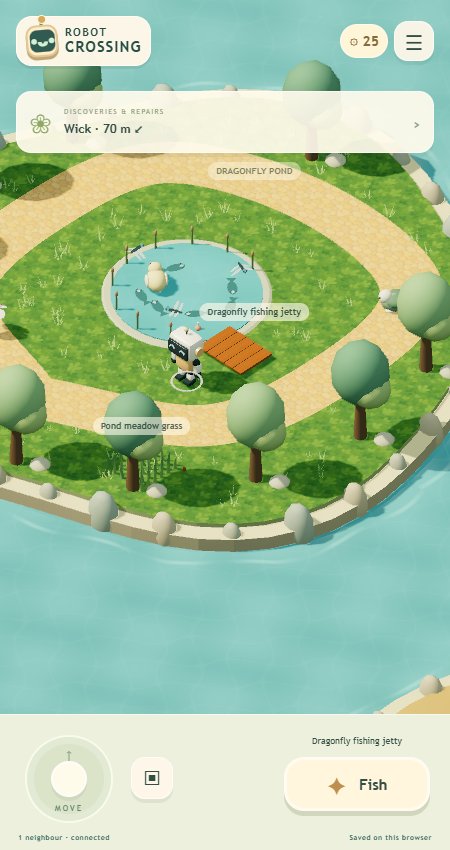
Two northern footbridges lead to Sprout Allotments and Dragonfly Pond. Follow either destination from the map or open Nature journal in the village menu. All activities are available immediately; tools and seeds are free.

  • Growing plants: interact at one of four community seed beds. Plant copper carrots (60 seconds, 20 Bolts), sunberries (90 seconds, 30 Bolts), or glowflowers (120 seconds, 40 Bolts). Water once to start growth. Sprouts and fruit develop in the 3D world; saved watering timestamps let growth continue across refreshes and closed browsers. Anyone can water or harvest a community bed. The first confirmed harvest receives the reward and frees the bed.
  • Cutting grass: visit marked patches at the allotments, pond or orchard. Tap or sweep across all twelve tufts and finish trimming for 18 Bolts. The shared world patch shrinks, gradually regrows and becomes available again after two minutes. A competing cut cannot award a second payment for the same growth cycle.
  • Fishing: cast from the pond jetty or Seabreeze boardwalk. After 2.5 seconds the bobber dips and the written bite cue appears. Reel in within 90 seconds of casting. Catch and release records a fish and pays 12–26 Bolts; a new species adds 10 Bolts. Each location cycles through three species; collecting all six adds a one-time 60-Bolt bonus. Wait 12 seconds after a catch to cast again. Missed fish cost nothing.
  • Moving wildlife: watch a rabbit, hedgehog, robin, duck, butterfly and tortoise. Interact nearby to record each animal for 10 Bolts; all six award another 50 Bolts. Creatures are visual residents that do not block robot movement. Their bounded roaming paths derive from time, without continuous network traffic.
  • Nature journal: shows fish counts, wildlife sightings, crops harvested and patches trimmed, with tracking links to activities and animals.

These additions extend old saves lazily. The room coordinator stamps accepted activity times and orders shared rewards. Crops and regrowth use browser wall clocks; changing device clocks can affect these timers, and this remains a trusted-peer game rather than a server-authoritative economy. Refresh every player for content revision 4. The existing 4,096-operation save limit still applies; timers themselves do not consume operations.

Activity inspiration: the GameFAQs getting-started walkthrough describes tool-based fishing, planting and island routines; Nintendo's island overview highlights gardening, fishing and wildlife. Robot Crossing uses original creatures and rewards, short crop cycles and forgiving fishing controls.

Controls

  • Phone: drag the left movement pad and tap the main action button. The label tells you what you are about to interact with.
  • Desktop: WASD or arrow keys move in screen-relative directions. E or Space interacts. Escape closes a panel.
  • Portrait: the world sits above the controls. Landscape: controls sit over the lower corners of the world.
  • Use the bag button for your items, the task card for a guide, and the menu for your name and shell colour, music, invitations, chat, save export, and graphics reload. Choose Change name and colour, edit either field, and save. Neighbours see the changes, and your existing robot keeps its home, items and progress after refresh.

All shared changes need a connected, synchronised village. Movement remains available during a disconnection, while spending and rewards pause.

Playing together

Open Invite a neighbour and share the same RCWeb room link or QR code. Use a valid room, for example the local test village. A phone needs the server's LAN/reachable host address; its own localhost address will not reach your computer.

Players see each other's robots, repaired garden, cottage ownership, and decorations. Enter an owned cottage to visit; only its owner can rearrange it. Nearby chat reaches players within four metres in the same indoor/outdoor space. Choose Chat with nearby players in the menu, or interact with a nearby player, to open a conversation window. It includes message bubbles, names, timestamps, a nearby-player list, typing indicators, quick replies, and a 500-character multiline composer. Enter sends; Shift+Enter adds a line. Incoming messages open the window when no other dialog is active; otherwise an unread badge appears on the menu button and the chat menu entry shows the count. The most recent 100 messages you personally heard are kept in this tab’s sessionStorage, scoped to room and robot, and survive refresh. History is not distributed to late arrivals or included in village saves. Failed sends retain the draft and report the problem. The core does not yet implement line-of-sight filtering for chat within a zone.

Player identity is saved separately from the connection ID. Keep using the same browser profile to return as the same robot. If two tabs claim one robot, one becomes read-only for shared actions. Independent browsers/contexts create separate players.

Returning profiles enter automatically without the name prompt. Refresh retains the robot's identity, progress, and last valid position (stored per room/player in sessionStorage on page exit). Remote avatars are deduplicated by player identity, and a new connection epoch resets its movement sequence. Music resumes on the first touch or interaction after automatic entry.

Remote movement now sends at approximately 10 Hz and plays through a 180 ms interpolation buffer, with a gradual walking-animation transition. Late packets hold the last position rather than letting robots drift. Cottages use their original compact size outside. Entering cuts to an isolated room view scaled 1.5 times larger, while robots, beds, plants, and lamps retain their normal proportions and therefore appear smaller relative to the room. Outside observers still see the compact cottage. Interior movement, visiting players, floor height, camera framing, and the exit use the appropriate space; saved decoration coordinates remain compatible. Daisy Lane and Seabreeze remain set back to keep the garden and main path clear.

Waterwheel tiles show the connected water path in blue, with inlet/outlet markers beside the actual endpoints. Hints identify the corrected row and column. Modal tips and errors appear inside the dialog above its scrolling content; the landscape puzzle places its controls beside the pipes so both remain visible.

Movement uses a circular robot footprint, rounded obstacle corners, sliding, and short collision steps so thin fences cannot be skipped. Players block one another only in the same space. Fresh peer positions drive collision; delayed render positions are kept outside the local robot where the scenery permits. Connections with no position update for 1.5 seconds stop displaying or blocking the way. Late arrivals separate, and entering or leaving a cottage finds nearby clear ground instead of spawning inside another robot or furniture. If no arrival space exists, the transition is refused with a visible message.

Solid scenery includes cottage foundations and sale signs, fountain, benches, Bloop, waterwheel, shop, tree trunks, lamps, garden fences and raised beds, rocks, and pier/bridge posts. River collision matches the bridge opening; the visible pier is walkable to its end. Interior walls, bed, plants, and lamps use their displayed dimensions. Flowers and rugs remain walkable. A robot caught by newly placed furniture is moved to a nearby clear position with a notification. Collision is client-side and uses received peer positions; it is not a server-authoritative physics simulation under arbitrary latency.

Saving and recovery

The current village and its preceding snapshot are stored in browser localStorage. Connected browsers exchange compatible ordered snapshots. The status at the foot of the game reports connection and local save results.

A room code is a meeting place, not a server-side save. If every browser closes, a browser holding the saved village must return to restore it for new devices. A different browser, hostname, scheme, or port does not automatically have your old profile/save. A fresh device cannot recover an absent browser's village using the room link alone.

Export village save downloads the current state, profile ID, room, and any detected conflicting copy. This core has export but does not yet have an import or interactive branch-selection screen. If saves disagree, spending pauses and the original copies are preserved. The core's coordinator can recover from the tested ordinary peer departure; arbitrary partitions and simultaneous divergent cold starts still require the planned recovery work.

The core preserves operation IDs to prevent retrying a repair or purchase twice and has a 4,096 accepted-operation limit. It reports when that limit is reached. Long-running production play needs the planned checkpoint/claim-ledger compaction before this limit is raised.

Phone dialogs

In landscape, dialogs use the screen width: short challenge instructions sit beside the puzzle, conversations put actions beside the text, and Options uses a three-column grid. Extra clues expand when needed. Save export and graphics troubleshooting are under Save & troubleshooting in Options.

Decorating keeps the floor plan and Place/Done buttons visible while the gift list scrolls separately. The map has its own scrolling destination list. Longer inventories, journals and expanded hints can still scroll; dialog feedback and the close button stay visible. Portrait keeps the stacked layout.

Art and audio

The world uses five 256-pixel generated surface textures, including a 1.9 KB painted sand texture. Robot geometry is modelled from an imagegen reference sheet using articulated rounded solids. High-resolution concept images are source material and are not loaded during play. Static geometry batches, instanced plants, capped pixel ratio and automatic effects reduction keep the richer lighting within a bounded rendering budget.

Ten original regional scores and prototype footsteps are generated locally with Web Audio after Start or the first interaction on a returning visit. Each score has a 16-bar form, with different melodies, tempos, accompaniment and a second-half variation:

| Location | Theme | Character | | --- | --- | --- | | Brightharbour | Morning Circuits | Cheerful plucks, bass and a light pulse | | Forest Grove | Chimes in the Leaves | Airy bells and a slower melody | | Repair Quarter | Clockwork Shuffle | Bright triangle plucks and a swinging rhythm | | Sunny Beach | Seabreeze Postcards | Relaxed, gently swinging seaside tune | | Sprout Allotments | Little Seedlings | Playful gardening melody | | Dragonfly Pond | Dragonfly Reflections | Sparse bells and softer accompaniment | | Sunpatch Woods | Sunpatch Waltz | A lilting three-beat woodland tune | | Beacon Coast | The Homeward Light | Gentle bells and a homeward melody | | Tinker’s Scrap Yard | Almost-Things Rag | A playful, swinging salvage tune | | Cottage interiors | Lamplight & Tea | Lower, quieter and slower home music |

Music follows local position, independently for each player. An 800ms boundary hold and 2.4-second crossfade prevent abrupt changes; bridges retain the previous area's music until you reach land. At most two scores play during a transition. The audio-clock scheduler does not depend on render frame rate, skips missed scheduling windows on resume, and disconnects retired mix buses. Hidden tabs suspend audio. Muting while travelling still records the destination so unmuting selects the appropriate theme. No additional music downloads or libraries are used. Opening Echo chimes fades background music out while keeping the challenge notes at normal volume, including free play. Closing or replacing the dialog gently restores the music without changing the mute preference.

Interface/turn/confirmation sounds come from Kenney's CC0 Interface Sounds pack; see asset sources and generation prompts. Options still toggles music and sound together; separate sliders remain planned. Tests cover location selection, boundary holds, crossfade limits, muted/hidden/suspended scheduling, all eight live area transitions, refresh and complete non-clipping score renders. Auditioning on physical phone speakers remains outstanding.

Sunpatch Woods

Take the new southern bridge from Forest Grove to Sunpatch Woods, or track Sunpatch picnic clearing on the map. A looping trail connects the picnic clearing to Grandfather oak and its tiny root door. The woodland contains 44 deterministically placed trees in four forms: oak, pine, silver birch and golden maple, with ferns, bluebells, mushrooms, berry shrubs, moss and a fallen log with growth rings.

The picnic clearing has a slatted table and benches, tea and plates, a checked blanket, basket, book, cushions, lanterns and bunting. Trunks and substantial furniture block movement; low plants and the blanket are walkable. Tree crowns fade when they hide a robot.

The woodland's authored contact shadows use four spatial batches and a small radial shader. They are now lighter to complement the live sun shadows described below. The current content revision 7 requires every player to refresh; existing profiles, houses, gardens and inventories retain their saved state.

Verification: 49 behavioural unit tests pass. Browser checks cover every route centreline, all 25 repair/home/scenic destinations, woodland tree and furniture collision, bridge plank heights, scenic interactions, crown fading, map tracking, exact legacy-save preservation and refresh identity, plus 450×960 and 844×390 layouts. At 1280×800 the woodland views used approximately 212–246 draw calls and 215,000–232,000 triangles, with all five existing textures; measured headless Chrome timing was around 57–60 fps. Physical-phone performance remains unverified.

Lighting, water and grass

  • Sun shadows: a filtered directional shadow map follows the camera, with 2048px maps on desktop, 1024px on touch devices, and 512px in Light mode. Moving local and visible remote robots refresh shadows every rendered frame, including their settling animation after stopping. Idle scenery refreshes at up to 10 Hz (2 Hz in Light mode); new decorations and house cutaways invalidate the map immediately. Cool sky fill keeps the shade readable.
  • Surfaces: Phong materials give robot enamel and metal fittings stronger specular highlights while wood, leaves and paths retain a mostly matte finish.
  • Water: seas, ponds, fountains and the river share animated ripple normals, subtle caustic patterns and occasional glints. A separate transparent strip follows each island's shoreline with moving foam. These are stylised shader effects, without scene reflection or refraction render targets.
  • Grass: 1,135 small instanced tufts are scattered across the islands. They sway gently, stay off authored paths and solid obstacles, and leave picnic blankets clear. Light mode draws approximately half of them. They are decorative and do not replace the playable mowing patches.
  • Bloom: a restrained bright pass and separable blur run at quarter width and height. The 3D scene renders to a linear LDR target; the final composite adds glow and encodes the result for the display. The HTML interface remains sharp. No new libraries or downloaded textures are needed.
  • Options → Graphics quality: Automatic starts with rich effects and switches to Light after two consecutive slow sampling windows. Rich keeps shadows and bloom enabled. Light disables bloom, reduces grass and uses a smaller shadow map with slower idle updates. Moving-player shadows retain frame-by-frame updates. The choice is saved locally; reduced-motion preferences stop cosmetic water and grass animation. Existing adaptive pixel-ratio reduction remains active in all modes.

Graphics checks verify animated framebuffer pixels, a small positive bloom contribution, actual shadow-map allocation, glossy robot materials, decoration shadows, grass clearance, house cutaways, saved quality selection, unchanged village saves, mobile layouts, peer robots and reduced motion. Repeated Rich/Light switching retained a stable geometry count and alternated between nine and six GPU textures (five assets plus rendering buffers). Physical iPhone/Android profiling is still outstanding.

Current limits and next work

Six wandering village friends have their own custom models and 36 light-hearted remarks: Tilly the kettle and Zip the one-wheel robot in the village, Dot the floating orb in Forest Grove, Fern the tall lantern in Sunpatch Woods, Bix the tracked postbox at Beacon Coast, and Clatter the mismatched scrap robot in the yard. They follow clear routes, pause at the ends, stop and turn towards you when approached, and occasionally greet you through the existing tip card. Tap Talk, then Tell me something else for more conversation. Each friend's remarks shuffle without immediate repeats. Names appear only nearby, and obstructing scenery fades around a nearby friend as well as the player.

These are ambient local characters, not player connections or repair jobs. Their wandering and conversations do not change village saves or use room messages; their exact stopping positions may differ between devices. They avoid scenery, local and remote players, and other wanderers. Player movement and arrival collision also respect their positions. Distant models are hidden, reduced motion removes cosmetic bobbing and waving, and moving visible friends refresh their shadows with the frame.

Ambient wildlife adds 38 small creatures across the village, grove, woodland, coast, ponds and stream: hopping birds, gliding gulls, swimming fish, butterflies, dragonflies and bees. Bees stop at existing flower heads for two seconds, carry visible pollen, and fly to the next flower. Fish use shallow silhouettes above the opaque water with gently changing swimming paths and moving tails. These creatures are decorative; they do not change collection rewards, gardening timers or saved progress. Models share geometry and materials, distant wildlife is hidden, Light mode halves the population, and reduced motion freezes the ambient animation. No new assets or dependencies are loaded.

Walking behind a cottage now reveals its actual bed, rug and saved decorations when its roof or front fades. Furnishings are hidden again when the shell becomes opaque. The exterior stays its original size; entering still uses the larger interior scale. Behavioural and browser checks cover flower visits, fish boundaries, clear bird paths, all four cottage cutaways, interior entry/exit, Light mode, reduced motion, portrait/landscape and save preservation.

This is the first core, not the complete game described in the game design and implementation plan. It now contains six NPC repairs, nine islands, twelve discoveries, four prebuilt cottages, and seven decoration types, plus gardening, mowing, fishing and moving wildlife. The complete twelve-robot cast, the remaining planned districts and vertical terrain, house upgrades, day/night schedules, furniture rotation, line-of-sight chat, and full save recovery/import remain future work.

The initial coordinator broadcasts bounded-by-schema full snapshots. Production snapshot chunking, persistence acknowledgements, stronger handoff/recovery, and long-lived history compaction remain outstanding. It is suitable for trusted room participants; RCWeb's peer-executed transport is not an authenticated economy.

Browser verification covers the complete repair/purchase/furnishing flow, reload, two independent player contexts, concurrent purchase rejection, visiting/chat, ordinary coordinator departure, network loss, tree occlusion, and several portrait/landscape layouts. Physical iPhone/Android performance, eight-player load, screen-reader review, and sustained audio listening still need validation. No Java, Maven, or server configuration changes are required.

Expansion verification includes a legacy-save playthrough of all three new repairs, all six discoveries, gift placement, refresh, late-joining peers, positions beyond the original map boundary, collision-map reachability for every activity, and portrait/landscape layouts. The earlier Bridges & Neighbours desktop village view used 137 draw calls and about 80,000 triangles; the larger Garden & Wildlife village test used about 180 draws and 160,000 triangles, with a pond view around 89 draws and 92,000 triangles; physical-phone profiling remains outstanding.

DocumentationServer TelemetryServer StatsServer HTTP LogServer WebSocket Log