RCWeb Soundboard
The RCWeb Soundboard (app/soundboard) is a shared room sound effects board. It is designed for phones, tablets, laptops, kiosks, or shared displays where any participant in the same RCWeb room can trigger sounds for everyone.
Screenshot
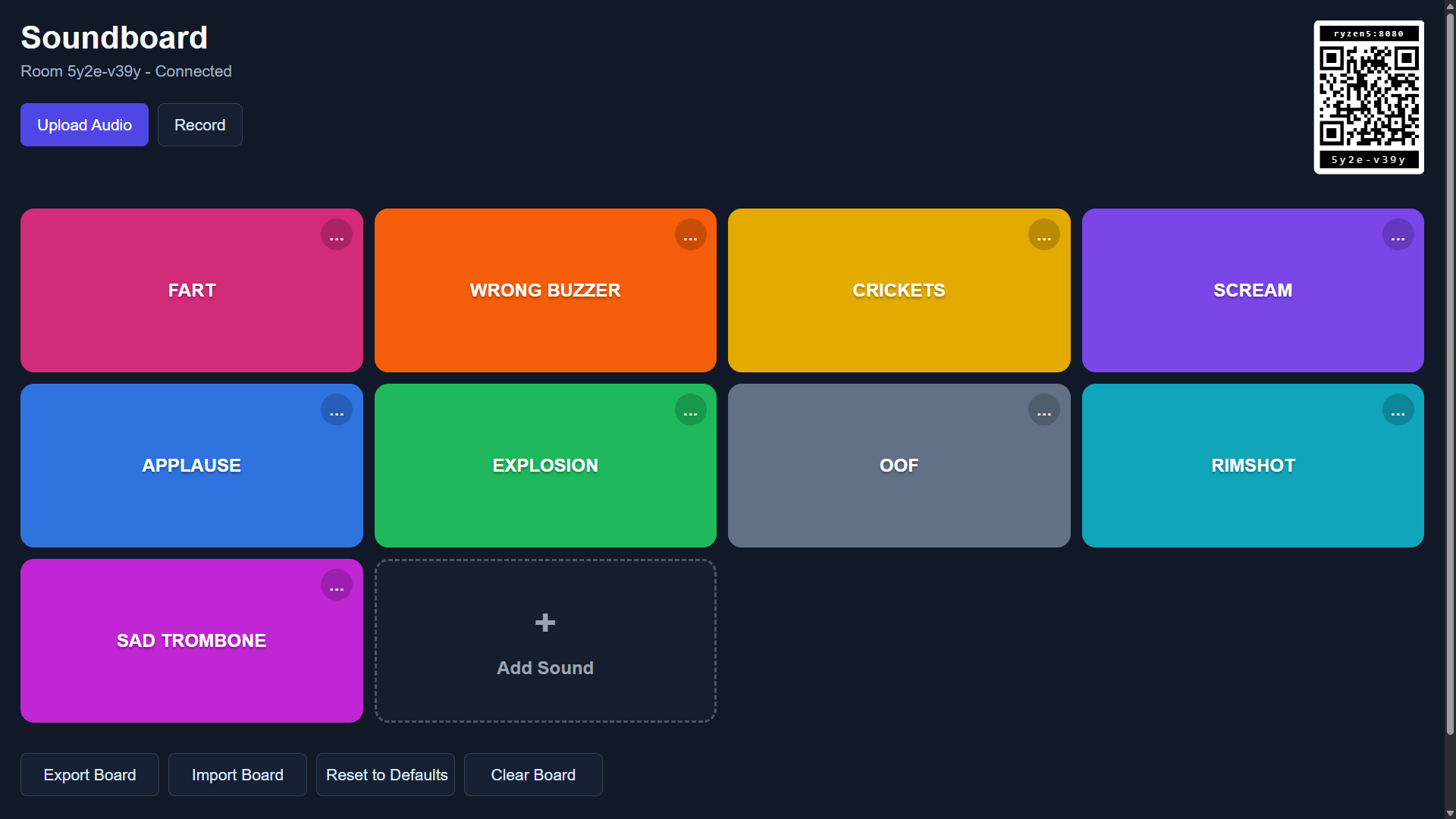
Overview
Soundboard turns each browser in a room into the same set of large sound effect buttons. Pressing a sound button on one device broadcasts a play command to every open soundboard app in that room, so all connected browsers attempt to play the same effect.
The app includes bundled sound effects, supports adding new audio files, and can record microphone audio directly in the browser. Added sounds become new buttons on the board and are shared with other room members while the source browser remains open.
How to use
- Open
/soundboard/in a browser. - Scan the QR code in the top-right corner to open the same room on another device.
- Tap any sound effect button to play it on every
soundboardapp in the room. - Use Upload Audio to add local audio files as new sound buttons.
- Use Record to capture a short sound from the microphone and add it to the board.
- Use each button's
...menu to rename or remove a sound. - Use Reset to Defaults to restore the bundled sound set, or Clear Board to remove all buttons.
If the browser blocks audio playback, tap anywhere on that browser once. Browsers usually require a local user gesture before remote audio commands can produce sound.
Features
- Large touch-friendly sound effect buttons.
- Plays sound commands across every
soundboardclient in the same room. - Shows a per-button playback progress bar for longer effects.
- Bundles common reaction sounds such as applause, rimshot, sad trombone, wrong buzzer, crickets, scream, explosion, oof, and fart.
- Supports uploaded audio files as new sound buttons.
- Supports microphone recording as new sound buttons.
- Allows renaming and removing any sound, including bundled defaults.
- Shows an in-app confirmation modal before removing a sound.
- Exports and imports board state as JSON.
- Shows unavailable sounds with a faded button and error marker when audio cannot be loaded or played.
- Keeps the QR code visible for quickly adding more controllers or players to the room.
Related app
Every participant uses the same Soundboard app. Open the same /soundboard/?r=<room> URL on every device that should trigger or hear sounds.
Sharing and availability
Keep the browser that added or recorded a sound open while others use it. Closing or refreshing it can make that sound unavailable. A faded button and error marker show a local loading or playback problem.
New arrivals can receive the current board from people already connected. Adding, renaming, removing, clearing, resetting or importing changes the board for the room. Playback timing can differ between devices.